Chrome extension
Chrome extension: your brand voice in every AI tab.
The PostSpan extension brings your brand memory into the AI tools you already use in Chrome, such as ChatGPT, Claude and Gemini. Pick a brand, write as usual, and the post comes out in your voice. Send it to PostSpan in one click to shape, approve and schedule it.
Works in
- ChatGPT
- Claude
- Gemini
- Grok
- Perplexity
- DeepSeek
How the PostSpan Chrome extension works.
- 1
Pick a brand
Sign in once. Your PostSpan brands show up right inside ChatGPT, Claude or Gemini.
- 2
Write as usual
Ask for a post the way you always do. Your voice, audience, offers and banned words come along.
- 3
Send it to PostSpan
One click puts the draft in your queue, shaped for each network you post on.
- 4
Approve, then it airs
Nothing goes live until you approve it. The results flow back into brand memory.
1Save it once
Your brand memory
 Northwind Coffee
- Voice
- WarmPlain-spokenNo emojis
- Voice by account
- LinkedIn page: consideredFounder profile: personalTikTok: playful
- Audience
- Busy morning regularsCommuters, 25 to 40
- Offers
- Spring menu from Tuesday10th coffee free
- Never say
- “best coffee ever”“game-changer”
- Winning hooksLearned
- Before-and-after carousels
2In the browser
Chrome extension
ChatGPT
PostSpan
- Northwind Coffee
- Northwind Roastery
Message ChatGPT…
Pick a brand inside ChatGPT, Claude or Gemini. Write as usual. It comes out in your voice.
Prefer an agent or the terminal? The same brand memory reaches any MCP agent and the PostSpan CLI.
Also in the extension: ask several AIs at once.
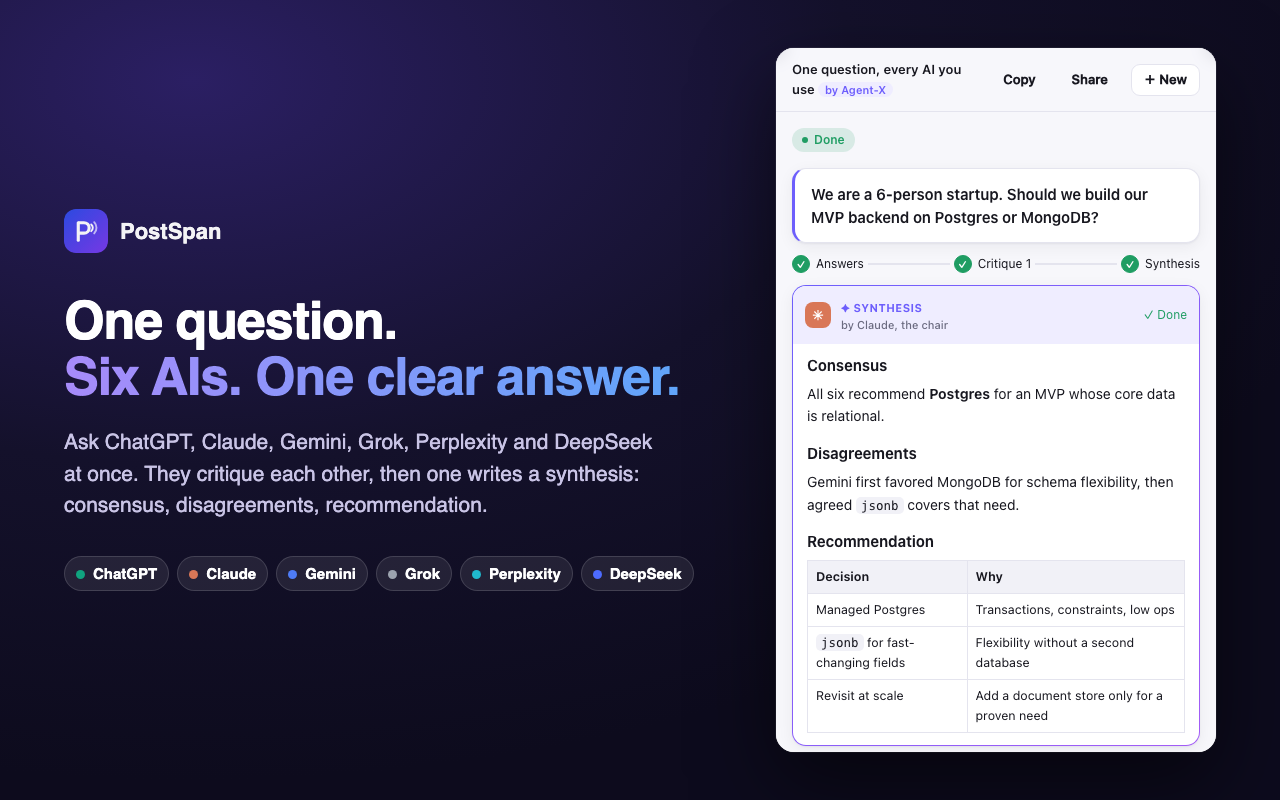
Stuck on an angle? Put the question to your whole AI team. Each one answers in its own chat, they critique each other, and one writes up the consensus, the disagreements and a recommendation.
Ask several AIs at once
One question to ChatGPT, Claude, Gemini, Grok, Perplexity and DeepSeek. They critique each other's answers, then one writes a clear synthesis.
Follow up on the same session
Add a constraint or new insight. Every AI revises in its own chat before a new synthesis.
Images included
Paste, drop or pick up to four images. Each AI sees them with your question.
Answers keep their shape
Headings, lists, tables and code look like they do in each chat. Copy the whole session, or share it.
Included on every plan · 7 days for $0 · cancel any time
Chrome extension FAQ
What does the Chrome extension do?
It adds your brand memory to the AI tools you use in Chrome, such as ChatGPT, Claude and Gemini. Pick a brand, write as usual, and the draft comes out in your voice. Send it to PostSpan in one click to shape and schedule it.
Do I have to switch AI tools?
No. The extension works inside the AI tools you already use, with the accounts you're already signed in to. No API keys and no extra AI subscription.
Is the extension included in my plan?
Yes. Brand memory, the Chrome extension, MCP access and unlimited posts are included on every PostSpan plan, and your first 7 days cost $0.
Does anything get posted without me?
No. Drafts you send from the extension wait in your PostSpan queue. Nothing goes live until you approve it.
Where do my AI chats end up?
In your own history on each AI site. The extension types into that site's chat box and reads the answer on the page, the same way you would.
Your turn on air
Sound like you.Post everywhere.Get better every week.
Save your brand voice, connect your channels, bring the AI tool you already use. Your first 7 days cost $0.
7 days for $0 · cancel any time
- YouTube
- Google Business
- Dribbble
- TikTok
- Threads
- X
- Slack
- Discord
- Mastodon
- +17 more